









Preparing GSN data
The table a Goal Structuring Notation (GSN) goal structure needs: one row per connection naming the element it leads to, which row each value goes on, the columns and what to call them, and a complete worked example.
One row per connection, naming the element it leads to
Each row names an element and, in Connected Node ID, the element it connects to: the goal, strategy or solution that supports it, or the context that qualifies it. Relationship Type says which. A goal with a strategy beneath it and two contexts beside it has three rows. An element nothing hangs from, such as a solution or a context, has one row with Connected Node ID left blank.
Values on a row describe that row's element. The exceptions are Relationship ID and the connector marks in Decorators, which describe the row's connection. When an element has several rows, give them the same element values.
The top goal
One row for each element beneath or beside it: SupportedBy to a strategy, goal or solution, and InContextOf to a context, assumption or justification.
Each strategy
One row for each goal it breaks the claim into, and one for each context, assumption or justification it relies on.
Each lower goal
One row for each element that supports it or qualifies it.
Each solution, context, assumption and justification
One row with Connected Node ID left blank.
Columns
| Column | Maps to | Well | Fill it in on |
|---|---|---|---|
| Node ID | Node ID | Data fields | Every row. Also drawn above the statement as the element's identifier. |
| Connected Node ID | Connected node | Data fields | Every row except elements nothing hangs from. |
| Node Type | Node type | Data fields | Every row. |
| Relationship Type | Relationship type | Data fields | Every row that has a Connected Node ID. |
| Label | Label | Data fields | Every row: the goal's claim, the strategy's reasoning, the evidence a solution refers to. |
| Status | Status | Data fields | Goals and solutions, for colouring and the summary strip. |
| Health | Health | Values | Optional. Any element. |
| Identifier | Identifier | Data fields | Optional. Drawn above the statement instead of the Node ID. |
| Module Reference | Module reference | Data fields | Away elements: the module the original is declared in. |
| Decorators | Decorators | Data fields | Rows that carry a mark. See GSN decorators. |
| Relationship ID | Relationship ID | Data fields | Optional. Names the row's connection, so a challenge can be aimed at it. |
| Challenged Relationship | Challenged relationship | Data fields | Optional. On an element that challenges a relationship rather than an element. |
| Order | Order | Data fields | Elements beneath the same parent, to set their order. |
| Diagram ID | Diagram ID | Data fields | Every row, when the table holds more than one argument. |
| Diagram Name | Diagram name | Data fields | Every row, for a readable name in the diagram picker. |
Node ID, Node Type and Relationship Type must be mapped before the argument draws. Without Node Type the Validation tab says Map the required Node type., and without Relationship Type it says Map the required Relationship type.
Other column names that bind
| Role | Also recognised |
|---|---|
| Identifier | Element ID, Element Identifier, GSN ID, Display ID, Tag |
| Module reference | Module, Module Ref, Module ID, Module Name, Source Module, Away Module, Referenced Module, Argument Module |
| Decorators | Decorator, Element Decorators, Marks, Marker, Annotations, Notation |
| Relationship ID | Edge ID, Link ID, Connection ID, Relation ID, Rel ID, Link Reference |
| Challenged relationship | Target Relationship ID, Target Relationship, Target Edge ID, Target Link ID |
| Status | Current Status, State, Condition, Current State |
A complete example
A cooling system safety argument: a top goal with a context and an assumption, a strategy over the identified hazards with its justification, three sub-goals, a solution, an away goal argued in another module, and a goal not yet developed. It validates with no errors or warnings. Cells with no value are left blank.
| Node ID | Connected Node ID | Node Type | Relationship Type | Label | Module Reference | Decorators | Status |
|---|---|---|---|---|---|---|---|
| G1 | C1 | Goal | InContextOf | Cooling system is acceptably safe to operate | |||
| G1 | A1 | Goal | InContextOf | Cooling system is acceptably safe to operate | |||
| G1 | S1 | Goal | SupportedBy | Cooling system is acceptably safe to operate | |||
| C1 | Context | Cooling system as installed in 2026 | |||||
| A1 | Assumption | Operators follow the approved procedures | |||||
| S1 | J1 | Strategy | InContextOf | Argue over each identified hazard | |||
| S1 | G2 | Strategy | SupportedBy | Argue over each identified hazard | |||
| S1 | G3 | Strategy | SupportedBy | Argue over each identified hazard | |||
| S1 | G4 | Strategy | SupportedBy | Argue over each identified hazard | |||
| J1 | Justification | Hazard list comes from the 2026 HAZOP | |||||
| G2 | Sn1 | Goal | SupportedBy | Loss of cooling flow is acceptably unlikely | Supported | ||
| Sn1 | Solution | Pump reliability test report | Current | ||||
| G3 | AG1 | Goal | SupportedBy | Overpressure is prevented | Supported | ||
| AG1 | Away Goal | Relief system is adequately sized | PRV-CASE-02 | Supported | |||
| G4 | Goal | Operator error is controlled | undeveloped | Open |
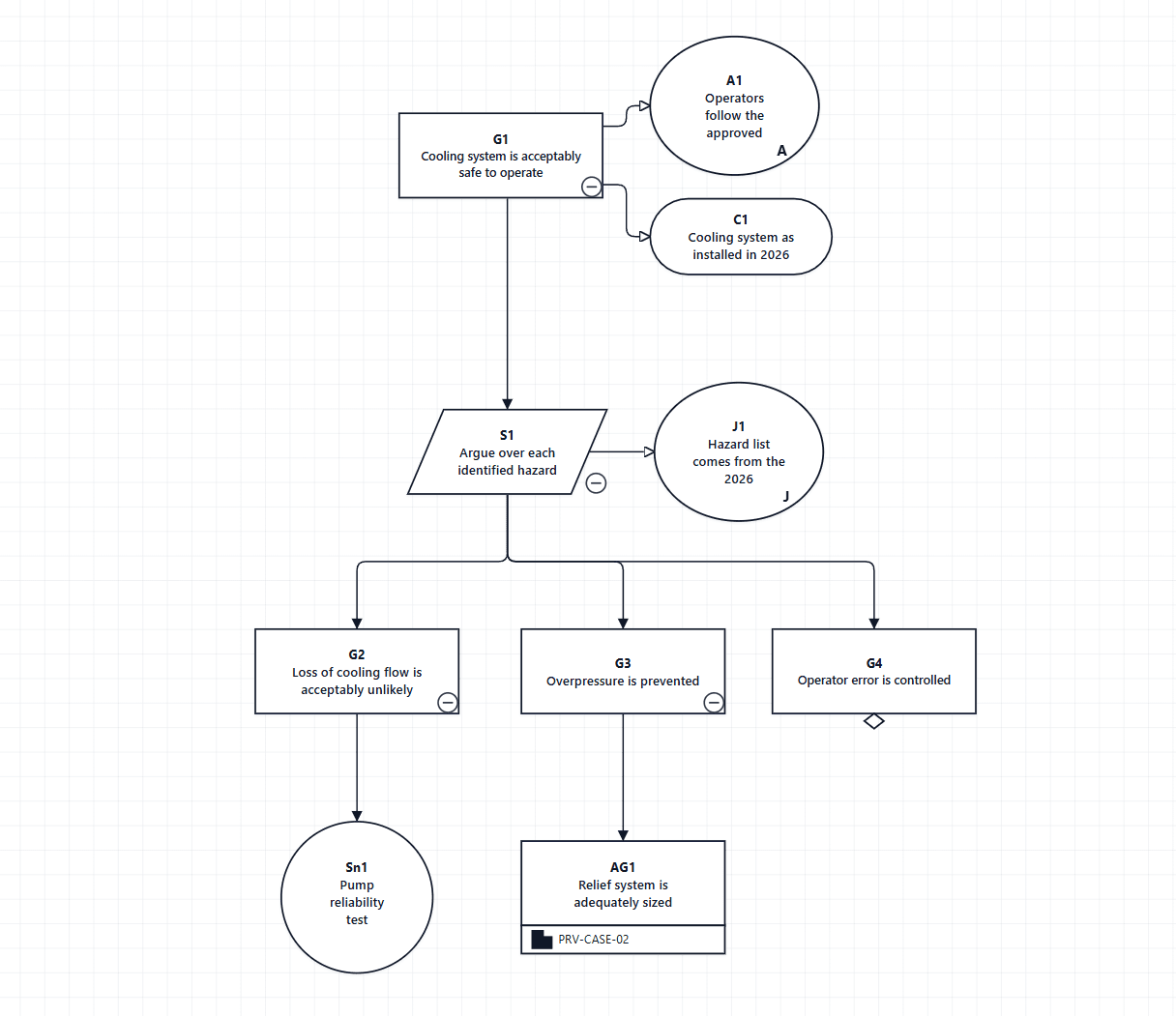
G1 has three rows: InContextOf rows for its context and its assumption, and a SupportedBy row for the strategy. S1 has four. G4 is marked undeveloped, so it has the hollow diamond beneath it. AG1 is an away goal, and PRV-CASE-02 is written in the band beneath it.
Identifiers
The standard gives every element an identifier, drawn above its statement, and the visual draws one on every element: the Node ID, or the Identifier column when one is mapped. Identifiers must be unique; two elements with the same one are reported.
Context, assumptions and justifications
Attach each with an InContextOf row from the goal or strategy it qualifies. They are drawn beside that element, not on a level of their own, and are not part of the support hierarchy. A context shared by two goals has one InContextOf row from each goal, both naming the same Node ID.
Away elements and modules
An away goal, context, solution, assumption or justification stands for an element declared in another module. Give it the Module Reference of that module, which is written in the band beneath the element. A Module or Contract Module element stands for a whole module.
A diagram made only of modules, contract modules and module interfaces is read as the architecture view. It needs no goal, and the connection rules for elements do not apply to it.
If your table names the element above
Some tables give each element one row naming the element above it. For those, set Data Mapping → Connection column → Reads as to Connected node comes before this row.
Left on the default, such a table draws upside down, with the solutions at the top, and says little about it. Often the only message is A solution cannot support a goal. Support runs from a goal to a goal, strategy or solution, and from a strategy to a goal.
Checks before binding the table
- Trim Node ID and Connected Node ID. An identifier that differs only by a space does not join.
- Give each connection its own row, with the same Label and element values on every row of an element.
- Keep Decorators cells for one element consistent across its rows. See An element with several rows.
- Give every element a unique Node ID, or map an Identifier column with unique values.
- Put the claims in a column called Label or Description.