









Preparing event tree data
The table an event tree needs: one row per node naming the node before it, which row each branch value goes on, the columns and what to call them, and a complete worked example.
One row per node, naming the node before it
Each row describes one node and, in Connected Node ID, the node it follows. A pivotal event has one node before it and two after it, so naming the one before keeps every node to a single row.
The initiating event
One row with Connected Node ID left blank. The initiating frequency goes on this row.
The first pivotal event
One row following the initiating event, with Relationship Type Next. It is the only way on from the initiating event, so it needs no probability.
Each branch
One row for the node the branch leads to, following the pivotal event it leaves, with Relationship Type Success Branch or Failure Branch and the branch probability.
Each outcome
The row for the last branch of a sequence. No row follows it.
Columns
| Column | Maps to | Well | Fill it in on |
|---|---|---|---|
| Node ID | Node ID | Data fields | Every row. |
| Connected Node ID | Connected node | Data fields | Every row except the initiating event. |
| Node Type | Node type | Data fields | Every row. |
| Label | Label | Data fields | Every row. |
| Relationship Type | Relationship type | Data fields | Every row except the initiating event. |
| Branch Label | Relationship label | Data fields | Branch rows, for the text on the connector, such as Detected or Not detected. |
| Probability | Probability | Values | Branch rows. |
| Frequency | Frequency | Values | The initiating event's row. |
| Order | Order | Data fields | Optional. Orders branches of the same kind at a split, and numbers the sequence identifiers. Number success branches before failure branches. |
| Status | Status | Data fields | Outcome rows, for colouring and the summary strip. |
| Diagram ID | Diagram ID | Data fields | Every row, when the table holds more than one tree. |
| Diagram Name | Diagram name | Data fields | Every row, for a readable name in the diagram picker. |
Node ID, Node Type and Relationship Type must be mapped before the tree draws. Without Node Type the Validation tab says Map the required Node type., and without Relationship Type it says Map the required Relationship type. Blank cells in either column are fine. Any other column, such as an outcome class or an owner, needs no mapping.
Other column names that bind
| Role | Also recognised |
|---|---|
| Probability | Branch Probability, Conditional Probability, Split Fraction, Branch Fraction, Path Probability, Prob, Q |
| Frequency | Initiating Frequency, Event Frequency, Occurrence Rate, Events per Year, Per Year |
| Relationship label | Branch Label, Relationship Label, Link Label, Edge Label |
| Branch label | Outcome, Outcome Label, Path Label |
| Status | Current Status, State, Condition, Current State, Current Condition |
Probability and Frequency bind only to number columns. Node ID, Connected node, Node type, Label and Order take the same names as on every diagram type; see Field mapping.
A complete example
A loss-of-containment tree: gas detection, then ignition, then fire suppression on the path where gas was detected. It validates with no errors, warnings or advisories. Probability and Frequency are in Values, set to Don't summarize. Cells with no value are left blank.
| Node ID | Connected Node ID | Node Type | Label | Relationship Type | Branch Label | Probability | Frequency | Order | Status |
|---|---|---|---|---|---|---|---|---|---|
| IE | Initiating Event | Loss of containment | 0.026 | 1 | |||||
| DET | IE | Pivotal Event | Gas detected? | Next | 2 | ||||
| IGN-A | DET | Pivotal Event | Ignition avoided? | Success Branch | Detected | 0.98 | 3 | ||
| IGN-B | DET | Pivotal Event | Ignition avoided? | Failure Branch | Not detected | 0.02 | 4 | ||
| OUT-1 | IGN-A | Success Outcome | Contained, no ignition | Success Branch | No ignition | 0.92 | 5 | Acceptable | |
| SUP | IGN-A | Pivotal Event | Fire suppressed? | Failure Branch | Ignites | 0.08 | 6 | ||
| OUT-2 | SUP | Consequence | Controlled fire | Success Branch | Suppressed | 0.97 | 7 | Major | |
| OUT-3 | SUP | Consequence | Escalated fire | Failure Branch | Not suppressed | 0.03 | 8 | Severe | |
| OUT-4 | IGN-B | Consequence | Unignited release | Success Branch | No ignition | 0.92 | 9 | Moderate | |
| OUT-5 | IGN-B | Consequence | Escalated fire | Failure Branch | Ignites | 0.08 | 10 | Severe |
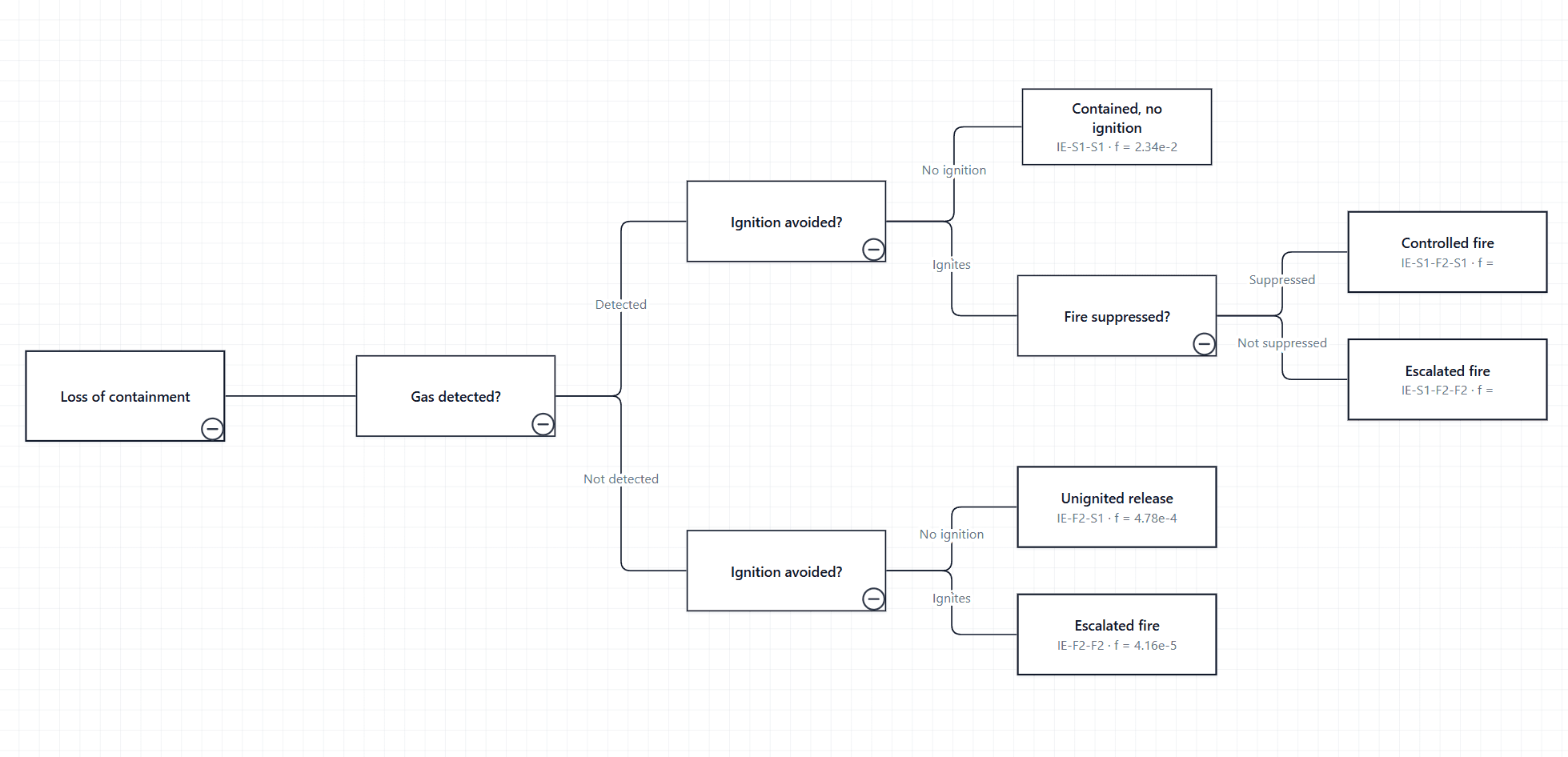
Ignition avoided? is asked on both paths out of Gas detected?, so it has two nodes, IGN-A and IGN-B, with the same label. Escalated fire ends two sequences and also has a node for each, OUT-3 and OUT-5.
What the example calculates
| Outcome | Shown on the outcome |
|---|---|
| Contained, no ignition | IE-S1-S1 · f = 2.34e-2 |
| Controlled fire | IE-S1-F2-S1 · f = 1.98e-3 |
| Escalated fire (OUT-3) | IE-S1-F2-F2 · f = 6.12e-5 |
| Unignited release | IE-F2-S1 · f = 4.78e-4 |
| Escalated fire (OUT-5) | IE-F2-F2 · f = 4.16e-5 |
Controlled fire, for example, is 0.026 × 0.98 × 0.08 × 0.97 = 0.001977, in the same units as the initiating frequency. The five frequencies add back up to 0.026, because every split sums to 1.
A pivotal event on several paths
A node has one node before it, so a function asked on more than one path needs one node per path: different Node IDs, the same Label. Reusing one Node ID makes a single node that both paths run into, drawn once.
Give each sequence its own outcome node, even when outcomes share a label. If several sequences end at one Node ID, the node is drawn once and lists every sequence on it, separated by |.
If your table names the next node
Some tables give each pivotal event one row per branch, naming the node the branch leads to. For those, set Data Mapping → Connection column → Reads as to Connected node comes after this row, and keep each branch's type, label and probability on the row that names it.
Left on the default, such a table is read backwards. The initiating event is reported with An initiating event starts the tree, so nothing may lead to it., and every outcome with An outcome ends its sequence, but this one leads on to another event.
Checks before binding the table
- Trim Node ID and Connected Node ID. An identifier that differs only by a space does not join.
- Enter probabilities as fractions: 0.98, not 98.
- Make the branches at every split add up to 1.
- Put Frequency on the initiating event's row only.
- Set Probability and Frequency to Don't summarize.
- Use Success Branch and Failure Branch at every split, so sequence identifiers read S and F.