









Preparing fault tree data
The table a fault tree needs: one row per node, which columns to include and what to call them, which row each value belongs on, and a complete worked example.
One row per node, naming its parent
Each row describes one node and names its parent, the node directly above it. Events and gates are separate rows: a gate is a node in its own right, between the event it defines and the events that cause it.
The top event
One row with no parent.
The gate beneath it
One row whose parent is the top event.
The gate's inputs
One row for each input, each with the gate as its parent.
Each intermediate event
Has its own gate beneath it: a row whose parent is the intermediate event, and that gate's inputs name the gate as their parent.
Basic, undeveloped and house events
End a branch. No row names them as its parent.
Columns
Name the columns as shown and each binds to its role without manual mapping. Put text columns in Data fields. Put numeric columns in Values and set each to Don't summarize.
| Column | Maps to | Well | Fill it in on |
|---|---|---|---|
| Node ID | Node ID | Data fields | Every row. |
| Parent ID | Connected node | Data fields | Every row except the top event. |
| Node Type | Node type | Data fields | Every row. Without it the tree draws but is not checked against the notation. |
| Label | Label | Data fields | Every row. |
| Relationship Type | Relationship type | Data fields | Rows attached as a condition, trigger or transfer. Leave blank for an ordinary input. |
| Order | Order | Data fields | Rows that share a parent, to set their left-to-right order. |
| Diagram ID | Diagram ID | Data fields | Every row, when the table holds more than one tree. |
| Diagram Name | Diagram name | Data fields | Every row, for a readable name in the diagram picker. |
| Linked Diagram ID | Linked diagram ID | Data fields | Transfer In and Transfer Out rows. |
| Probability | Probability | Values | Any event. |
| Failure Rate | Failure rate (λ) | Values | Any event. |
| Repair Rate | Repair rate (μ) | Values | Any event. |
| Mission Time | Mission time | Values | Any event. |
| Vote Threshold | Voting threshold (k) | Values | The voting gate's own row. |
| Vote Input Count | Voting input count (n) | Values | The voting gate's own row. |
| Priority Sequence | Priority sequence | Values | Each input row of a Priority AND, Sequential or Spare gate. |
| Event State | Event state | Data fields | House and zero event rows. |
| Dormancy Factor | Dormancy factor | Values | Each input row of a Spare gate. |
| Spare Mode | Spare mode | Data fields | The Spare gate's own row. |
| Spare Required Count | Required spares | Values | The Spare gate's own row. |
| Status | Status | Data fields | Any node, for conditional formatting and the summary strip. |
Only Node ID and Parent ID are needed for a tree to draw. The others add checking, values and presentation. Any further column you bind, such as an asset ID or owner, is shown in the Node Inspector without being mapped, and on hover too when it is in Values or Tooltips.
Other column names that bind
| Role | Also recognised |
|---|---|
| Probability | Prob, Failure Probability, Event Probability, Unavailability, Q |
| Failure rate (λ) | Lambda, Rate, Hazard Rate |
| Repair rate (μ) | Mu, Restoration Rate |
| Mission time | Exposure Time, Exposure, Operating Time, Mission |
| Voting threshold (k) | Threshold, K, M, VoteK, Minimum Votes, Required Count |
| Voting input count (n) | VoteN, N, Total Inputs, Vote Inputs, Total Count |
| Priority sequence | Sequence Order, Sequence Number, Branch Order, Input Order, Priority Order, Step, Event Order, Failure Order |
| Event state | House State, Switch State, On Off |
| Dormancy factor | Dormancy, Alpha |
| Spare mode | Spare Type, Redundancy Type, Standby Type |
| Required spares | Required Spares, Spares Required |
Which row a value belongs on
Most values describe the node on their row. Priority sequence is the exception: it describes the connection from the gate to one of its inputs, so it goes on the input's row, not the gate's.
| Value | Belongs on | Example |
|---|---|---|
| Probability, failure rate, repair rate, mission time | The event it describes. | Relief valve fails to lift: Probability 0.018 |
| Voting threshold (k), voting input count (n) | The voting gate. | Two of three protections lost: Vote Threshold 2, Vote Input Count 3 |
| Priority sequence | Each input of the ordered gate. | Duty pump seal fails: 1. Standby pump seal fails dormant: 2 |
| Spare mode, required spares | The Spare gate. | Duty pump with standby: Cold, 1 |
| Dormancy factor | Each input of the Spare gate. | Standby pump seal fails dormant: 0 |
| Event state | The house or zero event. | Turnaround in progress: FALSE |
A complete example
A loss-of-containment tree using an OR gate, an AND gate, a voting gate, a cold Spare gate, an undeveloped event and a house event. It validates with no errors under IEC 61025:2006. Cells with no value are left blank. Relationship Type is left out because every connection is an ordinary input, which is what a blank cell means.
| Node ID | Parent ID | Node Type | Label | Order | Probability | Vote Threshold | Vote Input Count | Priority Sequence | Spare Mode | Spare Required Count | Dormancy Factor | Event State |
|---|---|---|---|---|---|---|---|---|---|---|---|---|
| TE | Top Event | Loss of containment from transfer line | ||||||||||
| G-TOP | TE | OR Gate | Any release path | |||||||||
| IE-COR | G-TOP | Intermediate Event | Corrosion breach | 1 | ||||||||
| G-COR | IE-COR | AND Gate | Coating and inspection both fail | |||||||||
| BE-COAT | G-COR | Basic Event | Internal coating degraded | 0.012 | ||||||||
| BE-INSP | G-COR | Basic Event | Inspection misses wall loss | 0.04 | ||||||||
| IE-OP | G-TOP | Intermediate Event | Overpressure rupture | 2 | ||||||||
| G-OP | IE-OP | Voting Gate | Two of three protections lost | 2 | 3 | |||||||
| BE-PSV | G-OP | Basic Event | Relief valve fails to lift | 0.018 | ||||||||
| BE-ALM | G-OP | Basic Event | High-pressure alarm fails | 0.011 | ||||||||
| BE-TRIP | G-OP | Basic Event | Pump trip fails | 0.022 | ||||||||
| IE-SEAL | G-TOP | Intermediate Event | Pump seal release | 3 | ||||||||
| G-SEAL | IE-SEAL | Spare Gate | Duty pump with standby | Cold | 1 | |||||||
| BE-P1 | G-SEAL | Basic Event | Duty pump seal fails | 0.006 | 1 | |||||||
| DE-P2 | G-SEAL | Dormant Event | Standby pump seal fails dormant | 0.004 | 2 | 0 | ||||||
| UE-THIRD | G-TOP | Undeveloped Event | Third-party damage (not developed) | 4 | 0.002 | |||||||
| HE-TURN | G-TOP | House Event | Turnaround in progress | 5 | 0 | FALSE |
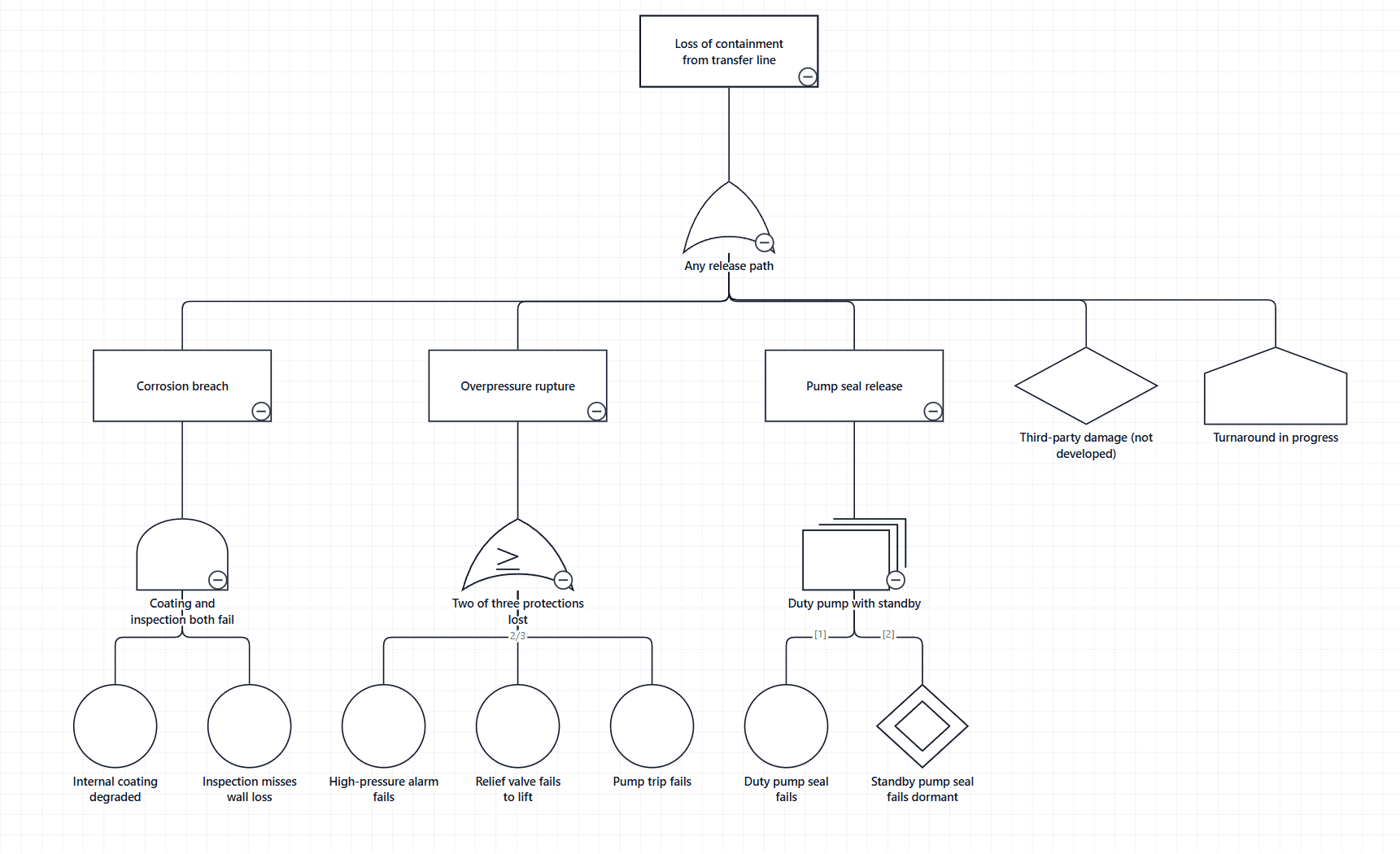
An event under more than one gate
Give the event one row for each gate it feeds, with the same Node ID and a different Parent ID. It remains one event: selecting it selects all of its rows.
An event with nothing beneath it is drawn separately under each gate that uses it. An event with its own branch beneath it is drawn once, connected to each gate. Advisory diagnostics note repeated events, because they matter to any probability calculated outside the visual.
More than one tree in a table
Add a Diagram ID column and give every row of a tree the same value. Add Diagram Name for a readable name. A Diagram Type column holding Fault Tree Analysis, Fault Tree, FTA or FT helps the visual open a fault tree when the table also holds other diagram types.
When a table restates each tree once per snapshot or period, filter or slice it to a single snapshot, so each node carries one set of values.
Checks before binding the table
- Trim the Node ID and Parent ID columns. An identifier that differs only by a space does not join.
- Type probability, rate, time, threshold, count and sequence columns as numbers. A text column is not bound to a numeric role automatically.
- Give every row a Node ID. Completely empty rows are skipped; a row with content and no Node ID is reported.
- Leave Parent ID blank on the top event. A blank cell, or one holding only spaces, means no parent.
- Keep node type wording as your source writes it. Case, spaces, underscores, hyphens and full stops are ignored, and unrecognised wording can be mapped under Node type values on the Data Mapping tab.