









Bow-tie edge list
Building a bow-tie from one row per connection: which node each row leads to, the columns, a complete example, shared barriers, and tables written the other way round.
One row per connection, naming the next node
Each row names a node, and in Connected Node ID the node it leads to. Follow the rows from a threat and they take you through its barriers to the top event, then on through recovery barriers to a consequence.
The hazard
One row leading to the top event.
Each threat
One row leading to its first preventive barrier, or straight to the top event if it has none.
Each preventive barrier
One row leading to the next barrier on the path, or to the top event after the last one.
The top event
One row for each consequence path, leading to the first recovery barrier on it, or straight to the consequence.
Each recovery barrier
One row leading to the next barrier, or to the consequence after the last one.
Each consequence
One row with Connected Node ID left blank.
Escalation factors and controls
A factor's row leads to the barrier it weakens. A control's row leads to its factor.
Columns
| Column | Maps to | Well | Fill it in on |
|---|---|---|---|
| Node ID | Node ID | Data fields | Every row. |
| Connected Node ID | Connected node | Data fields | Every row except consequences. |
| Node Type | Node type | Data fields | Every row. |
| Label | Label | Data fields | Every row. |
| Relationship Type | Relationship type | Data fields | Optional. Blank cells, or no column at all, are worked out from the node types. |
| Order | Order | Data fields | Threat and consequence rows, for the order of their paths. Barrier rows, for the order of barriers within a path. |
| Status | Status | Data fields | Barrier rows, and any other node with a condition. |
| Health | Health | Values | Barrier rows, and any other node with a measure. |
| Secondary Label | Secondary label | Data fields | Optional. A second line of text on the node. |
| Diagram ID | Diagram ID | Data fields | Every row, when the table holds more than one bow-tie. |
| Diagram Name | Diagram name | Data fields | Every row, for a readable name in the diagram picker. |
A complete example
A loss-of-containment bow-tie with a hazard, two threats, two consequences and one escalation factor with its control. It validates with no errors, warnings or advisories. Health is in Values, set to Don't summarize. Cells with no value are left blank.
| Node ID | Connected Node ID | Node Type | Label | Relationship Type | Order | Status | Health |
|---|---|---|---|---|---|---|---|
| HAZ | TE | Hazard | Pressurised hydrocarbon inventory | Leads to | |||
| THR-COR | PB-INSP | Threat | Internal corrosion | Threat path | 1 | ||
| PB-INSP | PB-COAT | Preventive Barrier | Inspection programme | Threat path | 1 | Effective | 0.96 |
| PB-COAT | TE | Preventive Barrier | Internal coating | Threat path | 2 | Degraded | 0.71 |
| THR-OP | PB-ALM | Threat | Overpressure | Threat path | 2 | ||
| PB-ALM | PB-PSV | Preventive Barrier | High-pressure alarm | Threat path | 1 | Effective | 0.99 |
| PB-PSV | TE | Preventive Barrier | Relief valve | Threat path | 2 | Effective | 0.98 |
| TE | RB-GAS | Top Event | Loss of containment | Consequence path | |||
| TE | RB-ISO | Top Event | Loss of containment | Consequence path | |||
| RB-GAS | RB-DEL | Mitigative Barrier | Gas detection | Consequence path | 1 | Effective | 0.98 |
| RB-DEL | CON-FIRE | Mitigative Barrier | Deluge system | Consequence path | 2 | Failed | 0.42 |
| CON-FIRE | Consequence | Jet fire | 1 | ||||
| RB-ISO | CON-SPILL | Mitigative Barrier | Automatic isolation | Consequence path | 1 | Effective | 0.95 |
| CON-SPILL | Consequence | Environmental release | 2 | ||||
| EF-AIR | PB-PSV | Escalation Factor | Instrument air failure | Escalates | |||
| EFC-AIR | EF-AIR | Escalation Factor Control | Backup air receiver | Controlled by | Effective | 0.94 |
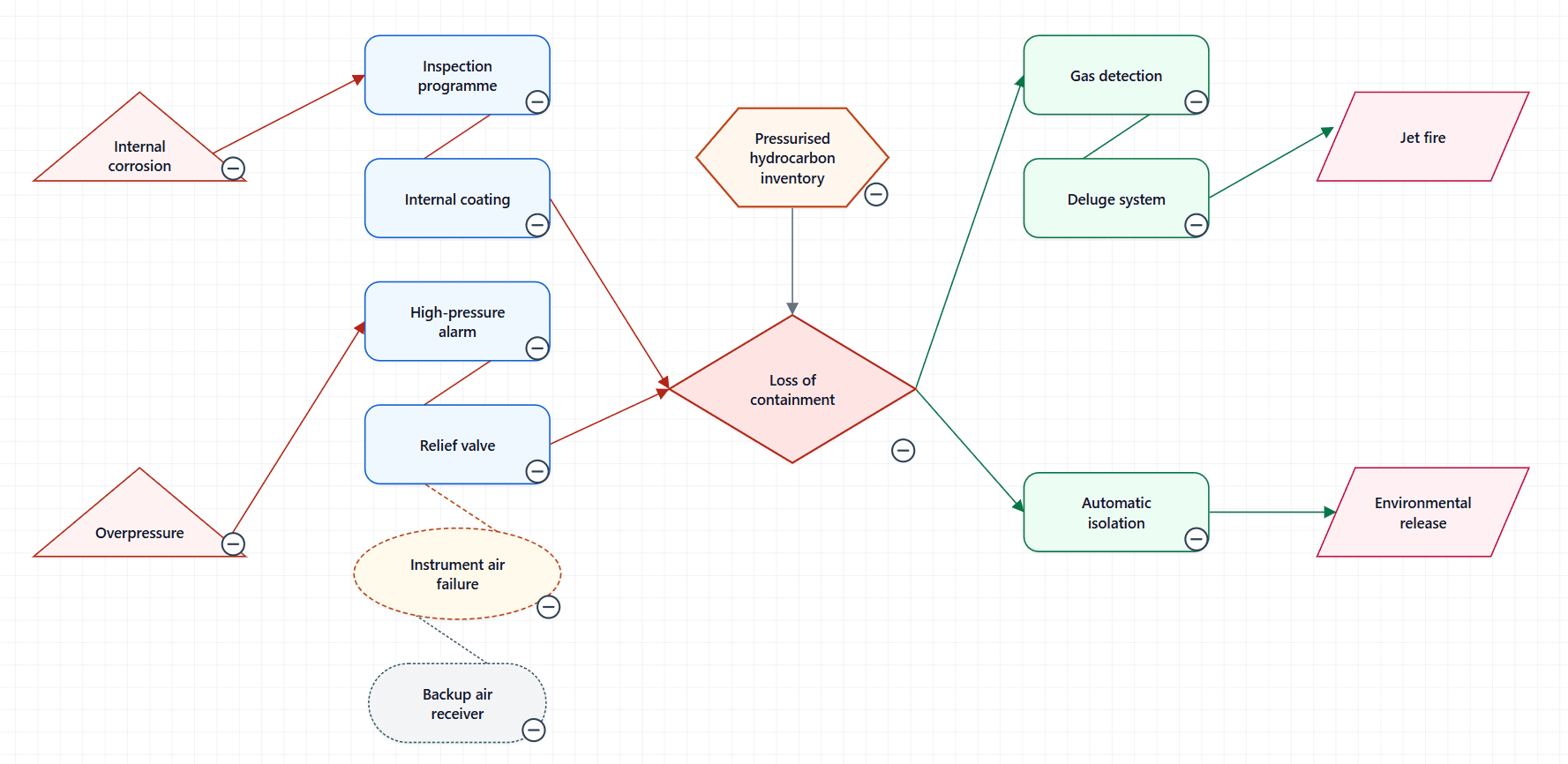
The top event has two rows because two consequence paths start from it. Two rows lead to Relief valve: High-pressure alarm, the barrier before it, and Instrument air failure, the escalation factor that weakens it.
Order is 1 and 2 on the threats and on the consequences, which sets the order of their paths from the top. On the barriers it restarts in each path, because it only sets the order within that path.
Give each threat a row leading to the same barrier Node ID. It stays one barrier, drawn in the path of the first threat, and the Node Inspector lists every threat it protects against. A recovery barrier is shared the same way, from the top event or from an earlier barrier on each path.
If your table names the previous node
Some tables are written the other way round: each barrier row names the threat before it, the way a fault tree's Parent ID names the node above. For those, set Data Mapping → Connection column → Reads as to Connected node comes before this row.
Left on the default, every path is read backwards. Each threat is reported with This threat never reaches the top event. and A threat cannot sit on the recovery side of the top event., and each consequence with the matching messages for its side.
Leaving Relationship Type out
Relationship Type is optional. Without it, a connection between an escalation factor and a barrier is read as Escalates, and one between a factor and its control as Controlled by. A barrier written as Barrier or Control, without a side, is placed on the side of the top event where it sits.